Select Version of EA Desktop:
Information associated to a license selected in the License Properties grid displays in the Related Records panel.

The detail in the Related Records tabs is available for editing directly in each tab, with the exception of Data Request, Seismic and Products.
To edit the Data Request detail, refer to Data Request.
To add or edit detail in the Seismic and Products tabs, you must first open the Editor View.
 To open Editor View...
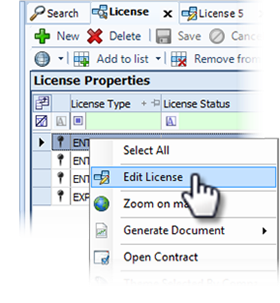
To open the Editor View, right-click on the license to open the context menu and click Edit License. The Editor View opens in a new tab with the Seismic and Products (and Cutouts) detail available for editing. For further detail, refer to Add a survey or product and Add a cutout.
The tabs that allow direct editing include:
Information associated to a license selected in the License Properties grid displays in the Related Records panel.
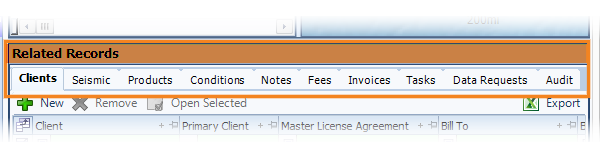
The detail in the Related Records tabs is available for editing directly in each tab, with the exception of Data Request, Seismic and Products.
To edit the Data Request detail, refer to Data Request.
To add or edit detail in the Seismic and Products tabs, you must first open the Editor View.
To open Editor View...
To open the Editor View, right-click on the license to open the context menu and click Edit License. The Editor View opens in a new tab with the Seismic and Products (and Cutouts) detail available for editing. For further detail, refer to Add a survey or product and Add a cutout.
The tabs that allow direct editing include: